
Controllers are my thing. I’m accustomed to great ones for competitive games, and I expect the best. I’ve dealt with a maker or two who’ve done custom builds, and those have done me well. That said, I’ve never had an experience like I’ve just had with AimControllers. After chatting with the team and then crafting my own battle-ready weapon, I’ve spent hours testing this new Aim MH5 PC controller. The most surprising thing to me is that I may never look at another controller in my collection again the same way.
A quick note: Although I’m reviewing the Aim MH5, there are a wealth of options available on AimController’s website. Their speciality is building something custom for you; something that will fit your playstyle and device. My Aim MH5 can only be connected by wired means, and is only going to work on PC. You may need an Xbox controller that has all digital buttons and bumpers, and AimControllers has your back. Take a look via the link below, and take advantage of their most recent discount listed below to get started.


My journey with AimControllers started in their online shop. The best part about picking up the MH5 isn't just the Marius board inside (which we'll talk about later), but that you get to customize your controller however you want it. In their online builder, you’ll be able to stick with just a base version of the controller, which features trigger locks and back paddles alongside the Marius board. The extras are fantastic, but will slowly raise the price of your MH5. Things like TMR thumbsticks, digital buttons and bumpers, and a ton of color and style customization are available for you to pick through to your hearts content. It can get pricey – my MH5 would have come out to $385 – but at least you have the choice as to what you’re paying for, as they start at a reasonable $229.
Once you complete your order, you’ll be waiting a bit for it to ship. The custom nature of the controller and the availability of the Marius board causes a bottleneck that will take upwards of fourteen or more business days. It can suck to wait, but for something bespoke, it requires time.
Opening the box, I finally got my personalized controller. I went with the red Modern Warfare design, which is as clean of a finish as it gets. The art and colors really pop, something you love to see in a custom build. As mentioned, there are a lot of options if you’re wanting a great design, including a brand new Modern Warfare 4 PS5 shell. All of the pieces are well assembled, close enough that you’d think you received it right from a PlayStation factory. My only disappointment is in the lack of accessories – there’s a tiny USB-C cable that is more or less good for updating, not playing, and that’s it. While you can add more thumbstick tops or a case, for the price, I’d like to see something additional in the box or at least a discount for those items if they’re added to the cart.
Speaking of a PS5 shell, the MH5 is built off of the already stellar PS5 controller. While the insides are completely swapped out, the feel is going to be familiar. I chose TMR thumbsticks and all digital buttons and triggers to go with my pretty MWIII and red design. I also went with textured grips to complete the ensemble – adding phenomenal comfort to the overall package. The Marius board is the most important piece, and as a more competitive leaning player, this was my best option.
Let’s start with that important piece. The MH5 is all about the Marius board inside. This hardware is all about the fastest possible input, 8000 Hz board with 0.125 ms latency, scrapping most additional features to get you there. There’s no Bluetooth, no internal battery, no touchpad, no rumble, and more. This also makes it extremely light, weighing in at only 250 grams. While a forced wired connection and lack of capability could frustrate some gamers, the point of this controller is lightning speed.
And speedy it is. As mentioned above, the Marius board offers 8KHz and 0.125 ms latency. As much as all of this sounds like buzzwords, in action this controller feels incredibly smooth. Yes, your computer has to be able to handle it, but if it does, you're off to the races. What this controller does is re-path your inputs to be more responsive, while offering the hardware to support 8KHz polling instead of you having to use drivers or software to improve the accuracy of your inputs. Nothing is limiting you artificially, something most players don’t even realize as they make tweaks that don’t address the core problems inside their controllers.
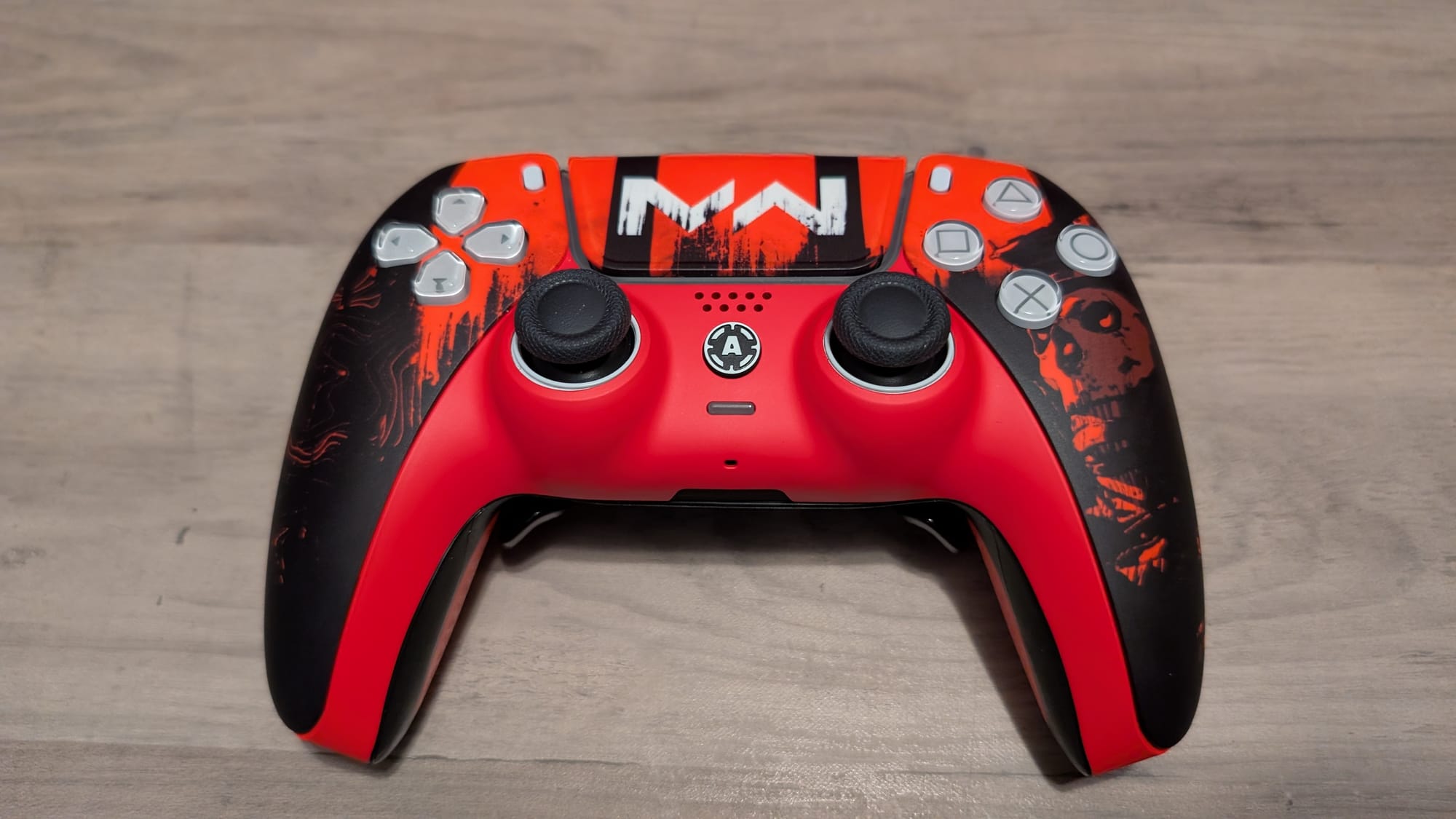
Tunnel Magnetoresistance (TMR) thumbsticks add even more precision to the build. Similar to Hall Effect sticks, these use digital measurements instead of physical sensing to interpret your directional pushes and pulls, leading to no drift. While you still will want to calibrate them occasionally (more on that software later), pairing these with 8KHz makes for some smooth sailing in both your character’s movement and your aim. I do have to give AimControllers a lot of credit for how quickly I acclimated to the feel of the thumbsticks. Many times I’ve had a decently long adjustment period for anything 8Khz and TMR; the MH5 was nearly instantaneous to adjust to.
Sprinting around my usual battlegrounds like Call of Duty: Black Ops 7 and Warzone, I felt a new lease on life. I’ve used a lot of great controllers, so the performance wasn’t necessarily a day and night difference, but my aim has been on another level, especially in Warzone. There are gunfights I can legitimately point to and assume that this controller has made the microscopic difference between losing and winning a shootout. Testing it with EMPULSE, I found very similar results, especially as I would glide around the maps using their advanced movement system. The most telling moment, however, was jumping into Halo Infinite. The combination of these elements is so smooth, I had to halve my usual stick sensitivity just to manage my overcorrections. I’m not sure what made Halo such an outlier, but once I made the change, I was clicking heads effortlessly. I'll definitely be using this with Modern Warfare 4, no doubt.
The digital buttons and bumpers I included in my MH5 are equally excellent. For those unfamiliar, analog buttons are more squishy, and are better for games that require touch, like a platformer. Digital buttons are like a quick draw – they fire near immediately. With the Marius board providing the right backdrop, the explosive nature of the buttons and bumpers is brilliant. The clicky-ness is simply to die for.
That extends to the trigger locks. I always love a good trigger lock, and AimControllers MH5 (and I'd assume at least the other PS5 models) host some fantastic ones. Being able to swap between a full and mouse-click pull in seconds is exactly what you want as a competitive player, or just one who likes the variance depending on the game you're playing. Just like every other aspect of this controller, they're responsive, and that's what matters most.
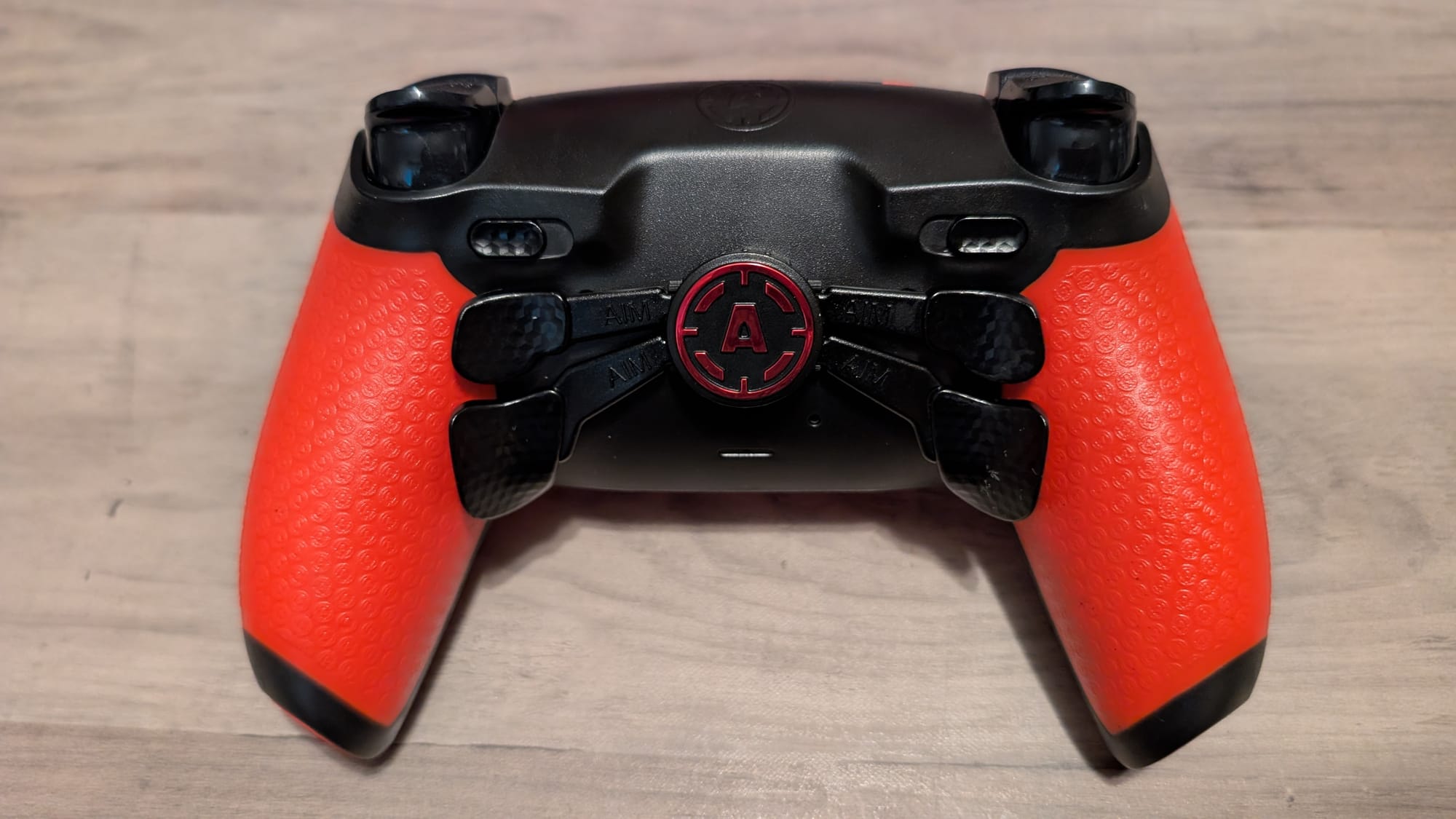
While I've grown to like the back buttons, these aren't my favorite. The MH5 sports AimController’s Spider Action V4 paddles, which rest pretty close to the back and are relatively in grip. My hands are smaller, so my experience may differ a bit from yours. Where the bottom two sit in grip, the top two are still a tad off, forcing me to hit them somewhat with the side of my finger. I've adjusted quickly, but I still prefer regular buttons to these paddles. I do appreciate being able to remap them manually, alongside doing so via software.
Software compatibility for these kinds of custom builds aren’t usually available. The MH5’s is one born out of the Marius board, and a necessary and extremely useful one. There are a bevy of changes you can make: remapping your back buttons, adjusting your deadzones, recalibrating the thumbsticks, changing the polling rate, and more. Beyond this, two choices for the software make it the best possible option. First, it’s all done in browser. You can update the firmware, adjust your settings, and use tools built to check your controllers performance in your Chrome window. Second, everything saves to the controller. There’s no need to keep the window open or download a profile to your computer. It’s all here, and it’s ready to rock and roll as soon as you click save. The team also fully calibrates your controller before it even arrives, so besides a few tweaks, you’re good to go out of the box.
AimControllers Aim MH5 PC controller
Excellent
This is one of the best controllers I’ve ever used, and didn’t even know I needed one. The incredibly accurate and well-calibrated nature of the AimControllers Aim MH5 PC controller makes it a must-buy for the ultra competitive gamer. Not everyone needs one, as its price and limitations outside of the space could cause pause. But, for what you’re buying it for, it leads in almost every aspect.
Pros
- Incredible build quality
- It puts the aim in AimControllers with tremendous accuracy
- TMR thumbsticks and Marius board 8KHz create buttery smooth experience
- Mouse-click buttons, bumpers, and trigger locks
- Software gives you plenty of autonomy and saves to controller
Cons
- Add-ons get pricey
- Top back button positions
This review is based on a retail copy provided by the publisher.












