If you own an Insta360 camera, you already know the team makes amazing cameras. They deliver high-speed, high-quality video, no matter how crazy the action shot. The only hitch is that the audio is often lacking. The onboard audio is just ok, and compared to the crystal-clear video, it feels like an odd compromise in an otherwise incredible package. As such, the Insta360’s Mic Pro arrives like a tidy answer to those compromises. It’s compact, carries multiple microphones to ensure clean audio capture, and has one special trait that makes it unique. Let’s get a closer look at the Insta360 Mic Pro.
Design and first impressions
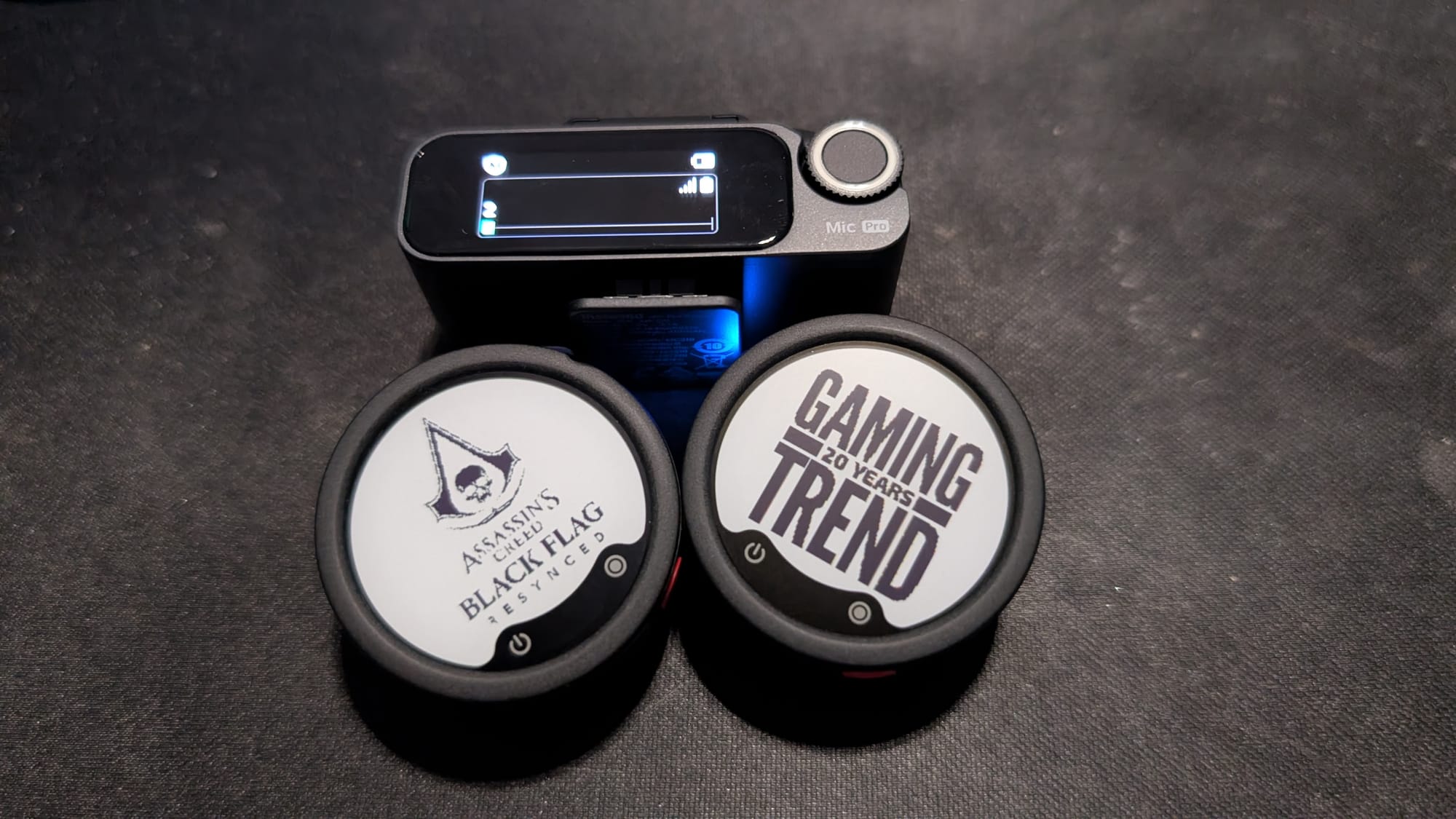
The Mic Pro is compact and has a design borne of watching their competitors make simple mistakes. Coming out of the box is a neoprene bag, a pair of clip-on wind screens, charging cables, two transmitters, a receiver with a screen, and a charging case that serves as not only a carrying conveyance, but also a proper power bank with up to 30 hours of additional charge ready to go. Just 5 minutes on the charger gives you another hour of power, so it doesn’t take much to ensure these microphones will outlast your entire day.
The two transmitters are circular with spring clips attached to the back. Pushing the clips up detached them from the back of the device, allowing you to use the included highly magnetic buttons to hold them. These magnets are STRONG, and will hold these through even a thick suit jacket – something I tested at a recent press event. These magnets, when detached, tuck into the case lid, ensuring they stay out of the way but also don’t get lost. Those are all nods to various misses by their competitors, but it’s what I found next that impressed me most.
The Insta360 Mic Pro is the only e-ink display on the market. More than just a gimmick, this 1.22” 6-color screen only consumes power when the screen changes. Not unlike a Kindle, this ensures this device has a metric ton of battery life – 10 hours of continuous use, in fact. The e-ink is clean, easy to read even in bright sunlight, and can be changed with a couple of taps of my phone app. I was attending an event for Assassin’s Creed Black Flag Resynced, so I loaded up the logo for the transmitter. The other one I loaded with a “GamingTrend - 20 Years” logo. The team was so impressed that they ran off and showed it to every other team member. That sort of impression is hard to beat, and all it requires is a touch of pre-planning to load the logos to your phone. As I prep to head out to Summer Games Fest, I think of all the ways I can raise the professionalism to the next level with a few button presses.
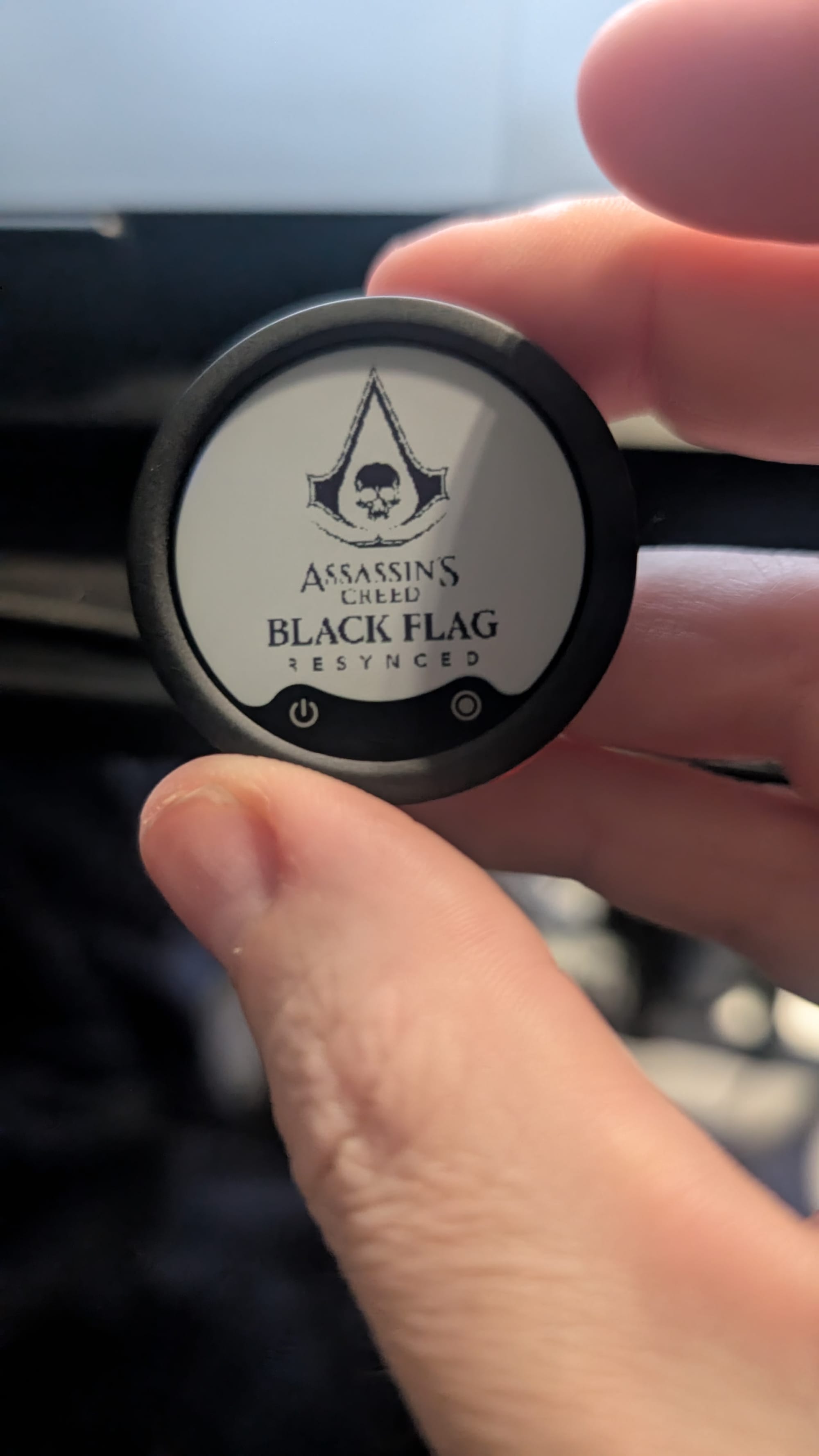
If you aren’t loading logos, there’s another non-obvious use for the e-ink – names and titles. When you are doing talking head shots, tight and close to the face, you can put their name and title on the device. It adds an air of professionalism and lets you recognize the talent at a glance. There are other microphones like this that have OLED screens, but the drain on the battery is significant, and it’s highly dependent on the overall brightness of the environment. This e-ink solution is genius and a game-changer.
Under the hood
To ensure the Mic Pro has a clean pickup, the transmitter carries three microphones in an array. This allows you to select between three polar patterns – omni, cardioid, and figure-8. This means one transmitter can act like a lav, a directional on-camera mic, or a two-person interview mic, depending on your need. It’s emulated, yes, but it does mean you can change your pickup in software rather than carrying bulky hardware with you to capture solid voiceover.
To help with noise, the Insta360 Mic Pro has an onboard NPU, or neural processing unit, is a specialized chip built to process artificial intelligence and machine learning task outputs. In this specific case, it’s handling noise cancellation with deep neural networks (DNNs) to separate human voices from background sound, delivering clean audio while still preserving battery life. More than just trying to separate out the sine waves, it listens to the audio and makes intelligent choices about what is and is not a human speech pattern. It does so on a continuous basis, but that’s not the only way it helps.
Beyond intelligent analysis of human speech, the NPU uses AI to handle unpredictable background noise. Not unlike high-end shooting hearing protection, with its ability to suppress gunshots and other loud noises, these can kill off typing, sirens, wind, dog barking, something being dropped on a desk, or suddenly snapping the case shut – something I did in my video above. By offloading these audio processing tasks to a dedicated NPU chip, the device processes sound more cleanly and quickly, stays cooler, and keeps a charge for significantly longer.

Floats lift more than boats
The NPU and DNN do a lot of heavy lifting for the Insta360 Mic Pro, but there are moments where things can get through – it happens. To that end, the Mic Pro has a 32-bit float for internal recording. If you’re unfamiliar, audio is captured at 24-bit, meaning there’s an effective range of 144 dB of dynamic range from the lowest low to the highest high. The remainder of that 32-bit is reserved for when things go above that 144 dB. Normally, that would cause the audio to “clip” and flatten out, losing all audio fidelity. This little bit of extra padding gives you a touch more audio to work with, ensuring you have a safety net to be able to bring down the audio, preserving what would otherwise be lost. When you’re capturing an interview, wedding, or live event where getting a second bite at the apple isn’t possible, you’ll appreciate having a little bit of a safety net.
Local Capture and File Safety
Each of the Insta360 Mic Pro’s transmitters records up to 32GB of audio, storing it internally on the device, retrievable via the USB-C port on the bottom. These are recorded in stereo, but also auto-split every 30 minutes to ensure you don’t have an overly long file that can become corrupted. Given that the 32-bit float track is recorded separately, even in the unlikely event that you were to have a corruption event, you have a backup recorded locally to ensure nothing is lost.
If you’re capturing outside, you’ll appreciate the pair of wind screens and the small neoprene carrying case. The case holds all of the accessories that don’t reside in the case. It’s water-resistant and provides a bit of protection when you throw it all in your gear bag. The wind screens use a clip-on approach rather than a mechanical connection, skipping the port for connection to ensure you aren’t wearing out the USB-C port. They sit over the top of the microphone screen, but don’t obstruct the screen, so you can still enjoy all the features of the e-ink display. It’s a smart design, and once more shows an attention to detail that Insta360’s competitors botched with their own entries into the audio space.
Real-world use and workflow
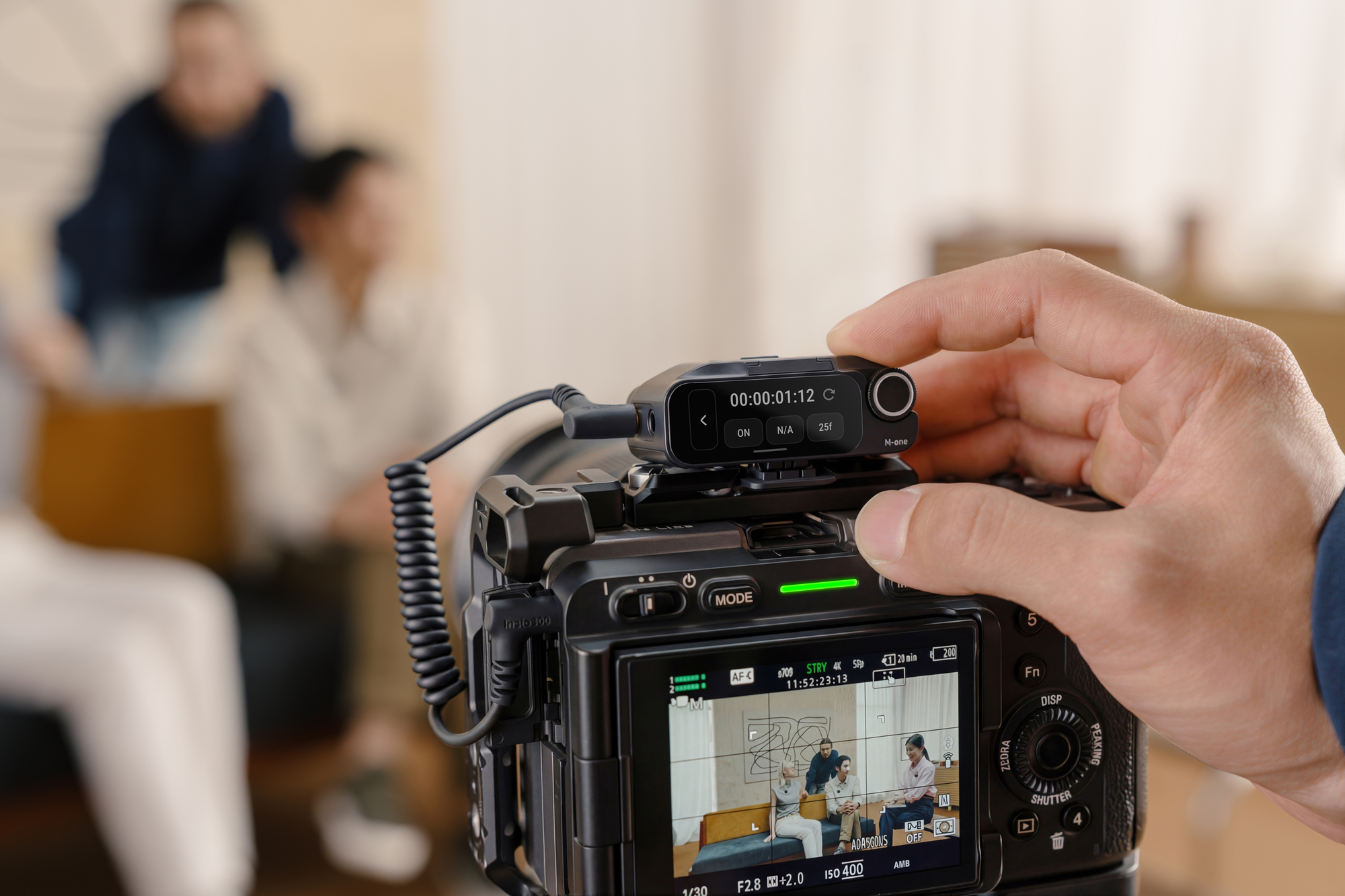
One of the best uses for these is obviously the aforementioned interview scenario. As you can record locally, these can be run independently of any camera, but there are multiple options for connectivity as well. The receiver sports a 3.5mm port to connect to just about any modern DSLR (such as my Sony FX-30), with the clip on the bottom allowing it to slide into the cold shoe. On top is another cold shoe – something I appreciated as it allows me to have a mount spot for something like a small light.
In addition to the 3.5mm option, you have two additional options for connectivity. Bluetooth obviously works with the Insta360 ecosystem, but if you intend to connect this to your phone, you’ll appreciate another option. Included in the case is a USB-C or Lightning adapter (you’ll select one or the other as part of the package – the other adapter seems to be sold separately), and removing a small cover on the back allows you to connect this adapter to the rear of the receiver. Plugging this into the bottom of your phone (or camera, if compatible) instantly allows you to connect up to it as an external audio capture system. All of these combined ensure this audio solution will work with just about anything you have at your disposal.
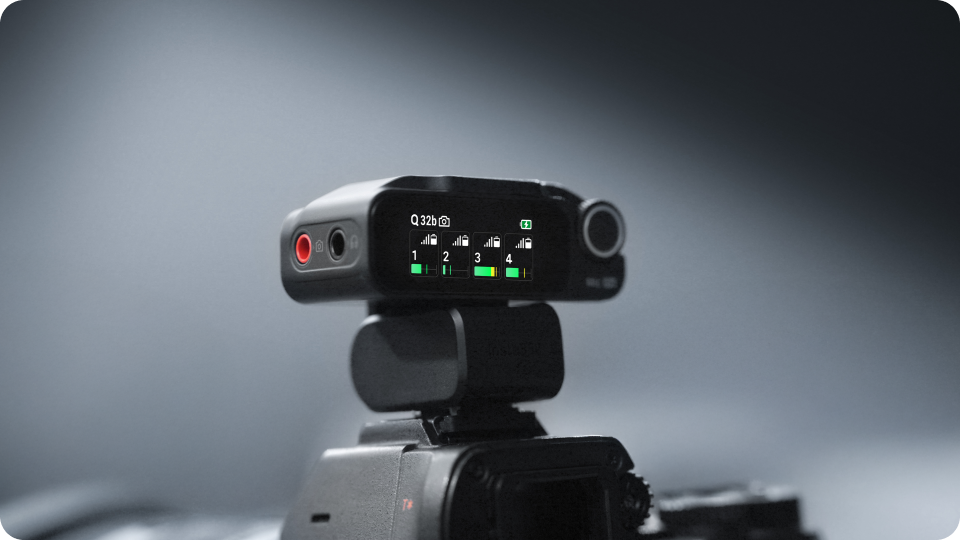
I mentioned that the microphones can be used in multiple polar patterns. This allows you to use one transmitter to capture you behind the camera and your subject in front of you, utilizing the figure-8 polar pattern. The second transmitter can be on another subject, letting you effectively capture three people with only two transmitters. For run-and-gun type vlogging, you can set the transmitter to cardioid, and you suddenly have a directional shotgun mic without the added bulk or drain on your battery. There is two use cases I wasn’t able to test (“2-to-4 mode”) and one that may justify the purchase on its own – “4-to-1” mode.
Not many microphones like this have the ability to pull in multiple audio streams. Here, the Mic Pro can be put into a “2-to-4” mode where you can distribute two transmitters across four receivers for multi-camera shoots, where your audio should be routed to multiple recorders. Similarly, it can also be put into 4-to-1 mode, allowing the feed to be split into four isolated tracks on a single receiver. This is the holy grail as it means you can have four subjects on camera, all with crystal clear audio capture, funneling to a single receiver and without the need for bulky external mixers and other hardware. In practice, the 4-to-1 mode worked like a charm, and with less than a minute of button taps to set it up. It’s surprising that it took this long to get an audio capture device that can capture four subjects, but Insta360 made it easy. I’ll still need two kits to test it properly.
Price and Performance
The E‑Ink screens and selectable polar patterns solve real set problems, and the 32-bit float and onboard storage reduce the chance of busted audio. The 4-to-1 and 2-to-4 modes extend the usefulness of the device well beyond the norm, and the carrying case tops up the device between shots at a speed that ensures you’re never out of power – you’ll run out of juice before the Mic Pro will.
Truthfully, if this sounds like a love letter for the Mic Pro, you’re on the right track. These are almost flawless. I say almost, as you’re going to pay full freight for these. At $329.99 for the 2TX+1RX kit, case, bag, screens, and everything you see in the video, it’s higher-end and priced accordingly. At that price point, I wish it came with longer than a 1-year warranty, so I might end up pairing it with a third-party protection plan from somebody like Asurion to keep it safe.
Insta360 Mic Pro
Excellent
The Insta360’s Mic Pro is one of those products that earns its place by solving small but persistent annoyances. It elevates itself above the rest by delivering innovations like the e-ink display, virtual polar patterns, and enough safety features like a 32-bit float and high-speed charging to make it a compelling choice. The price is high, yes, but it’s worth it.
Pros
- E-ink display is a game-changer
- 2-to-4 and 4-to-1 modes are a cut above the competition
- Various connectivity options mean it works with just about anything
- NPU and DNN ensure clean audio every time
- 32-bit float will save your bacon
Cons
- The price is a bit eye-watering
- 1-year warranty
This review is based on retail hardware provided by the manufacturer.