I spend a lot of time at my computer, working or playing games, and over the past few years I’ve been trying to make the time I spend there a bit healthier. I’ve got an adjustable standing desk, blue light glasses, and take regular breaks. As a writer though, I do have to spend a lot of time typing, which results in some slight wrist strain on occasion. It’s something I’ve learned to deal with, but it’s better not to deal with it. Enter the Razer Pro Type Ergo, a split ergonomic keyboard from Razer. I’ve been using this for the past few weeks, both writing and playing games with it, and while it’s not perfect, it has certainly made me more comfortable overall.
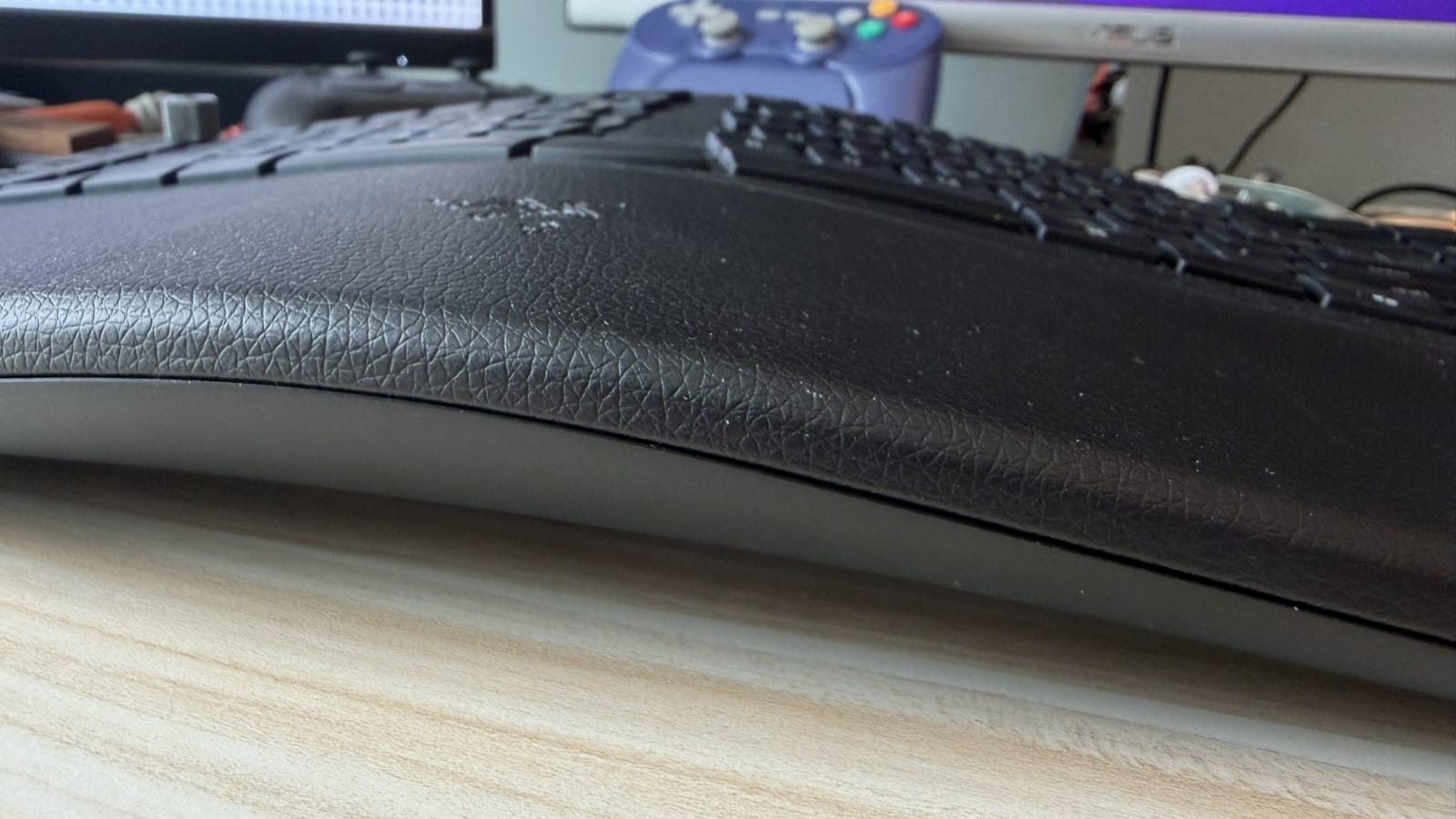
The first thing you’ll notice about the Ergo is how weirdly it’s shaped. The split of the keyboard is obvious in pictures, but what you might not notice is the big slope that peaks right at that split. OK, it’s not that big, but it’s definitely the most striking thing about the keyboard in-person. Looking at it, you wouldn’t think it would be comfortable to rest your wrists and hands on, but it’s actually the key that makes this thing so nice to use. The hump makes it feel like the device is molded for your hands, offering a perfect resting spot for your wrists on the wrist rest (which cannot be removed) which lets your fingers fit naturally into the concave keys. However, I do find that the hump ends a bit too early, which leaves my right wrist feeling less supported and comfortable than the left.
The split keyboard actually doesn’t take much effort to get used to either. Once I put my fingers on the home row, I was typing just like I normally would. A subtle but important part of this is having two Spacebars and two B keys. Both would be right in the middle of the split for typists able to hit B with either of their hands and both thumbs resting on the Spacebar. I typically reach for B with my left hand, whereas I hit Space with my right. Giving both to both sides pleases every possible person, a smart and very appreciated design decision.
As for gaming with the keyboard, it’s not bad but I would still pick a more typical setup if I was actually willing to swap out keyboards constantly. The angle WASD is at–thanks to the split design–does take some getting used to, but it’s not bad once you do. I mostly tested the keyboard with first person games like Halo: Reach, along with Razer’s DeathAdder V4 Pro and the Pro Click V2 Vertical mice. I can certainly see why someone would use a vertical mouse, but it’s not for me and I found it uncomfortable and difficult to use, so I stuck with the DeathAdder. It and the keyboard worked very well together, and after a while I stopped noticing the quirks of this keyboard as opposed to gaming with my usual, mechanical keyboard.
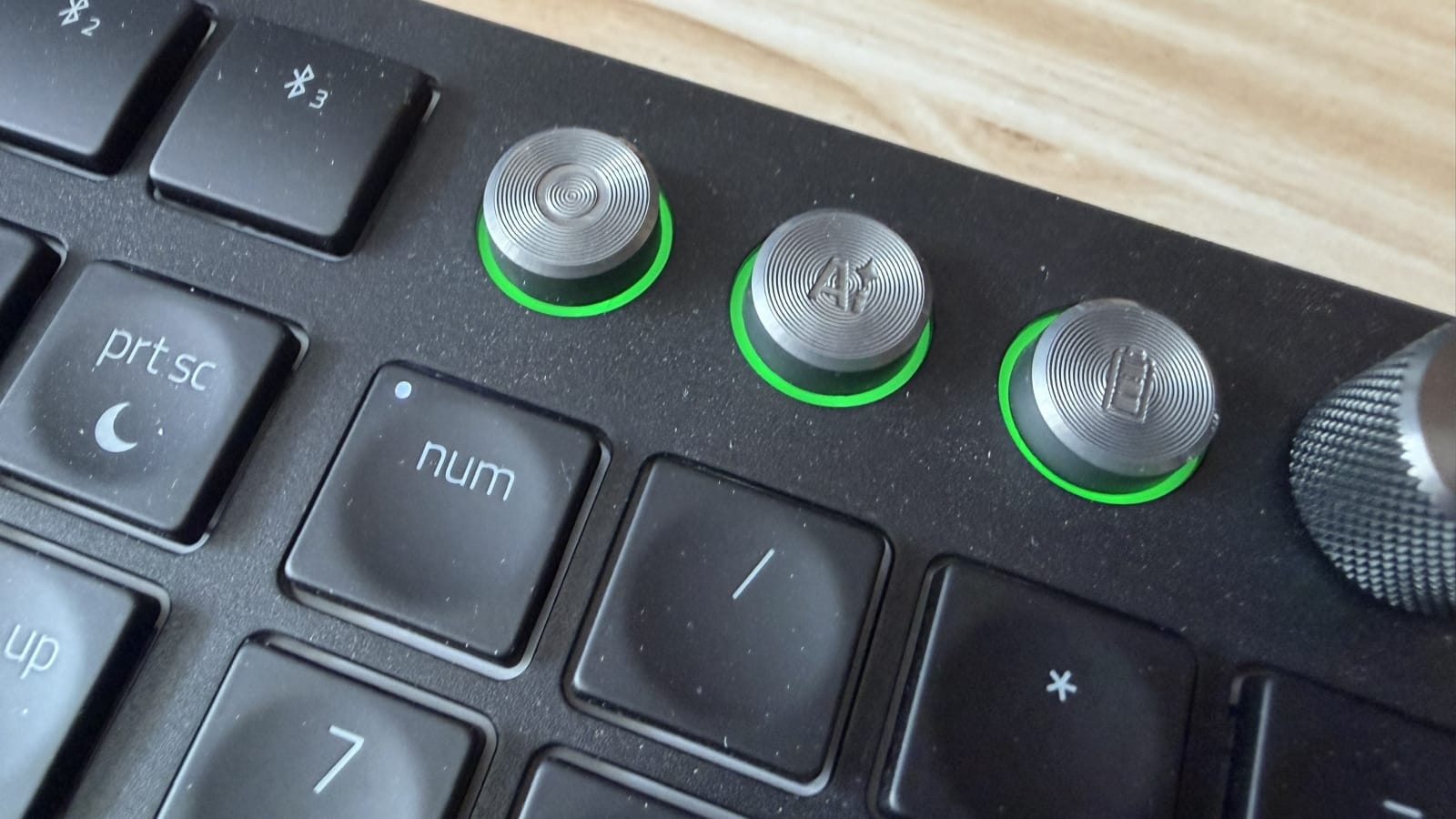
The Ergo has a ton of extra functionality I’ve been finding super useful that would make it hard to go back to my mechanical. While I certainly prefer having a more satisfying sound and feel when typing, this has a wireless option that allows you to connect with up to four devices at the press of a button. Alongside that, you can use two knobs to control things like volume, zoom, or horizontal scrolling, and five macro keys for whatever you want. I’ve set up two of them to be Copy and Paste, which has made daily computing tasks so much quicker, and another instantly shows my desktop which is great when I have tons of windows open. I set the remaining two to open Steam and Discord at the press of a button, though the Discord button doesn’t auto switch to that window when pressed unfortunately. Finally, there’s three extra buttons which, by default, pause/play any media, open an AI prompter, and check the keyboard’s battery level. Needless to say, I immediately rebound the AI prompter to just be Alt+Tab because screw that garbage.
So, where are the issues I mentioned? Well, they’re mostly in the software. You need Razer Synapse to program those macro keys and adjust everything else, and I think it also needs to be running in the background for things like that to work. I’m dual booting with Linux and Windows 11 on my desktop, and pressing F12 to go into the boot menu on this keyboard does nothing but make the RGB brighter as the board will default to not using the bindings of the function keys without holding another key. I can’t seem to get that to work either, but thankfully Linux defaults to a boot selection menu after a few sections so I can just get into Windows that way.
I’ve also experienced Synapse just breaking or not detecting the keyboard occasionally, and even ignoring my settings for things like brightness. I generally dislike RGB and prefer to keep it as dim as possible without being off, as the lights are an easy way to tell when the device is powered, and sometimes it just sets brightness to max for no reason. Conversely, it’ll also turn off the RGB entirely for no reason as well. This often happens after the keyboard auto-sleeps after 15 minutes of inactivity, but you’d think it would just go back on after hitting any key to wake it up.
Having to wake up my keyboard is also a bit of an annoyance, as the first keypress to do so won’t count as an input to the computer. When playing Final Fantasy XIV and trying to say thank you to my party after we finish a dungeon, I end up having to hit Enter twice to access the chat window. It’s not the most frustrating thing, but it does make me consider just keeping the keyboard wired in instead of using the wireless options. I really do like those wireless options though, as I’ve frequently needed to use an iPad for zoom calls while I work on my desktop as I don’t own a webcam. I can just press the first Bluetooth button to instantly connect to my iPad if I want to type something in chat there, then go back to the 2.4Ghz connection with that button to resume desktop operations. This is how wireless functionality should work on every device, frankly, and it’s a shame that one little annoyance would make me consider giving that up.
Beyond that larger annoyance, there’s also the battery life. The Ergo can supposedly last up to 30 days on a single charge, but only when in low power mode for that duration. In reality, at about 75% keyboard brightness it’ll last a workday and a half. Bring that down to 5% and it’ll last a lot longer, with the Synapse app still showing 100% battery after 5 days of use, but I’m not sure I trust the app to accurately report that statistic after the issues I’ve had with it. Checking it now, it’s already turned the auto dim setting back on when I turned it off a week ago.
If Razer can shore up the software side for this keyboard, I’d wholeheartedly recommend the Pro Type Ergo to anyone looking for some ergonomics with a bit of style. It’s not perfect, but it has significantly improved my overall comfort at my desk and it has some wonderful functionality. Again though, that's only when the software wants to work.
Razer Pro Type Ergo
Great
The Razer Pro Type Ergo is different from the company’s usual fair, focusing on ergonomics instead of gaming, but the alternate direction really pays off. The Ergo is super comfortable to use, whether typing or gaming, and has a ton of great bells and whistles. Its weakest point is unfortunately the Synapse software, which can really get in the way of what’s otherwise a great device.
Pros
- Very comfortable to use
- Surprisingly easy to acclimate to for typing and gaming
- Four wireless connection options
- Macro keys and knobs
Cons
- Reliant on Synapse software for customization to work
- Waking up from sleep doesn’t instantly send inputs
- Battery life can very wildly
This review is based on a retail copy provided by the publisher.