It's fair to say that we are in a strange period in time where drive costs can fluctuate in the time it takes to read this review. While there are bleeding edge PCIe 5.0 M.2 drives that emphasize speed and AI-specific tuning, there is a very real need for drives that prioritize capacity, cost per gigabyte, and sustained throughput. Today we're going to take a look at the Seagate’s FireCuda X1070 solid state drive—a drive that arrives as a timely entry in the current NVMe market that does all of those things and more. Let's get under the hood and see in what use case the Seagate FireCuda X1070 delivers its best performance.
Installation and Design
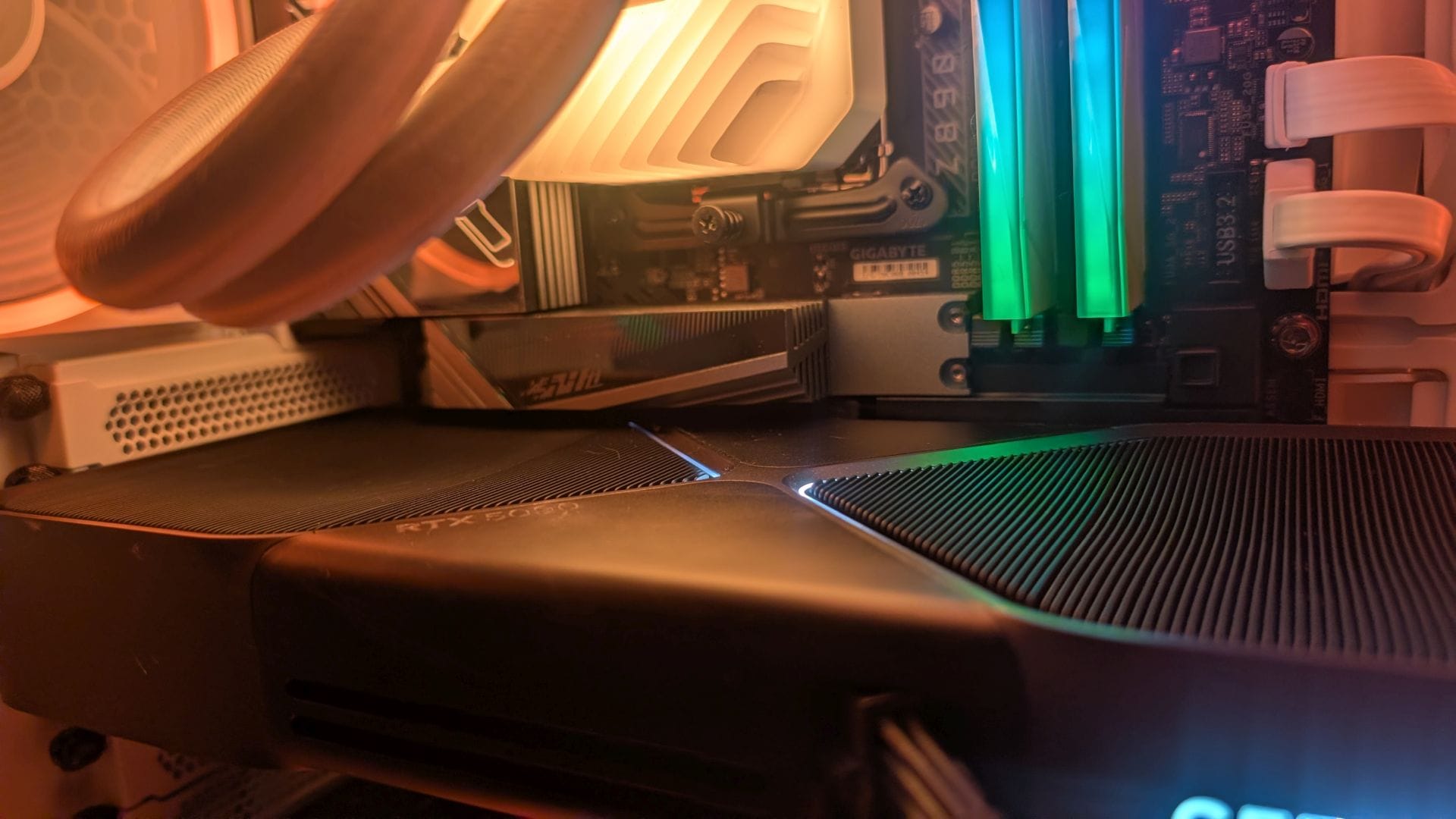
Seagate keeps the X1070’s hardware design straightforward. The drive uses the standard M.2 2280 form factor and is single‑sided, making it viable for laptops and smaller platforms like the ROG Ally and the Steamdeck. In my case, they are cleanly seated underneath an M.2 heatsink shield, which provided more than adequate cooling to prevent thermal throttling. Installing it is traightforward as you can get, with most motherboards requiring a single screw to hold it in place, and a quick trip to the operating system's Disk Management section to format it.
A layer down, we see that Seagate selected the Tenafe TC2201 as the controller for the FireCuda X1070. It’s a modern, cost‑focused Gen4 controller, designed to pair with high-density QLC 3D NAND (232-layer QLC from Micron) to deliver the rated speed, while keeping costs reasonable—important in the current climate.
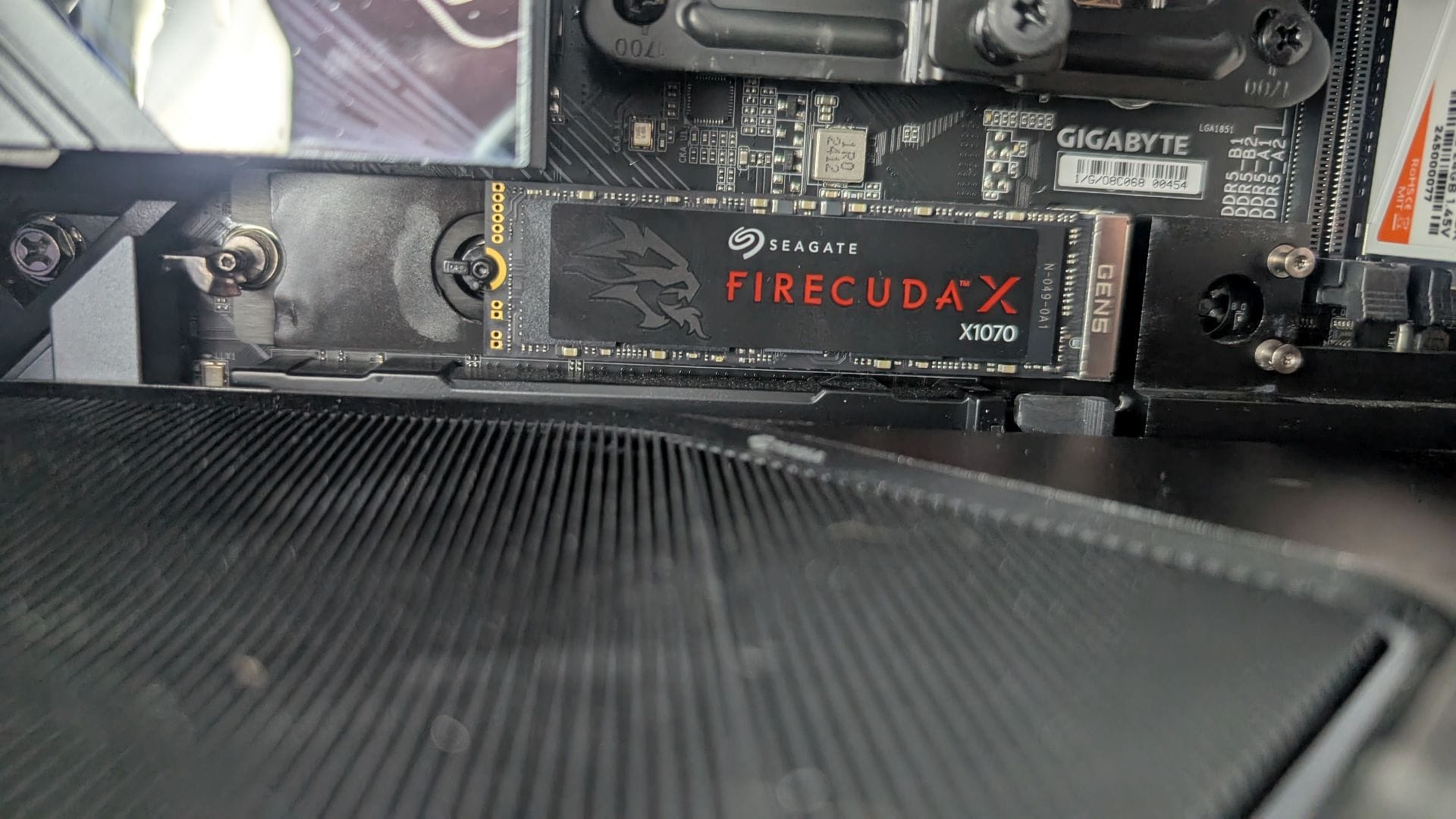
This drive is DRAM-less, instead using a relatively new technique we've seen in the last few years—HMB, or Host Memory Buffer. HMB borrows a small portion of system memory to hold the mapping tables and metadata, acting as a buffer to help random reads and writes find their target. In this case, it uses roughly 64MB, which is effectively nothing in the grand scheme of 16GB or more of system memory that is standard these days. HMB is a far better implementation than the fully DRAM-less approach, though it still has one limitation.
I mentioned that the system uses QLC NAND from Micron. This combination enables high capacities (4TB in this case) as well as solid performance across the board, plus solid SLC-like cache for burst writes, but once that cache is exhausted, we should see some drop—perhaps even a significant one on long, sustained writes. We'll check that in our testing.
On the back of the box, Seagate advertises this drive at up to 7,200 MB/s sequential read and 6,000 MB/s sequential writes, with a small spread based on size for IOPS. IOPS, or Input/Output Operations Per Second, is a common measurement of how many discrete read and write operations a storage device and perform each second. It's more commonly associated with small block performance (read: moving smaller files) than large sequential throughput, but that's important as many files in a program are on the smaller size, and there are lots of them. In this case, the 1TB model handles 850,000 read and 900,000 write IOPS, with the 2TB model hitting 900k and 1 million read/write, and the 4TB splitting the difference at 900k for each. This puts the Seagate X1070 in the upper tier of PCIe 4.0 drives.
With the hardware understood, let's dig into the measurements for how it performs, starting with synthetic tests. I’ve always been a fan of CrystalDiskmark and ATTO for benchmarks as they give a wide variety of block sizes you can use to show consistency in results. Even thought it exists in a vacuum (it can only really be compared against itself as it uses an aggregate score number), I also like the sustained write capabilities of 3DMark and PCMark. Let’s start off with CrystalDiskmark:
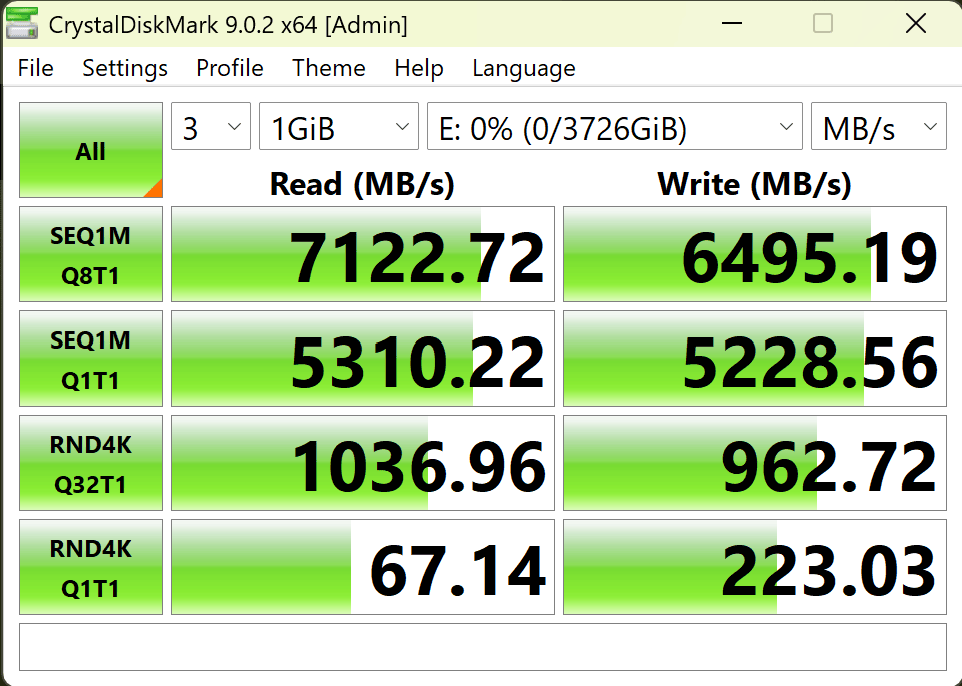
It's always nice to see a drive deliver precisely what it advertises. With very little deviation, this drive can deliver around 7200 MB/s read and 6400 MB/s write speeds in CrystalDiskMark. Now let's take a look at a longitudinal test with ATTO.
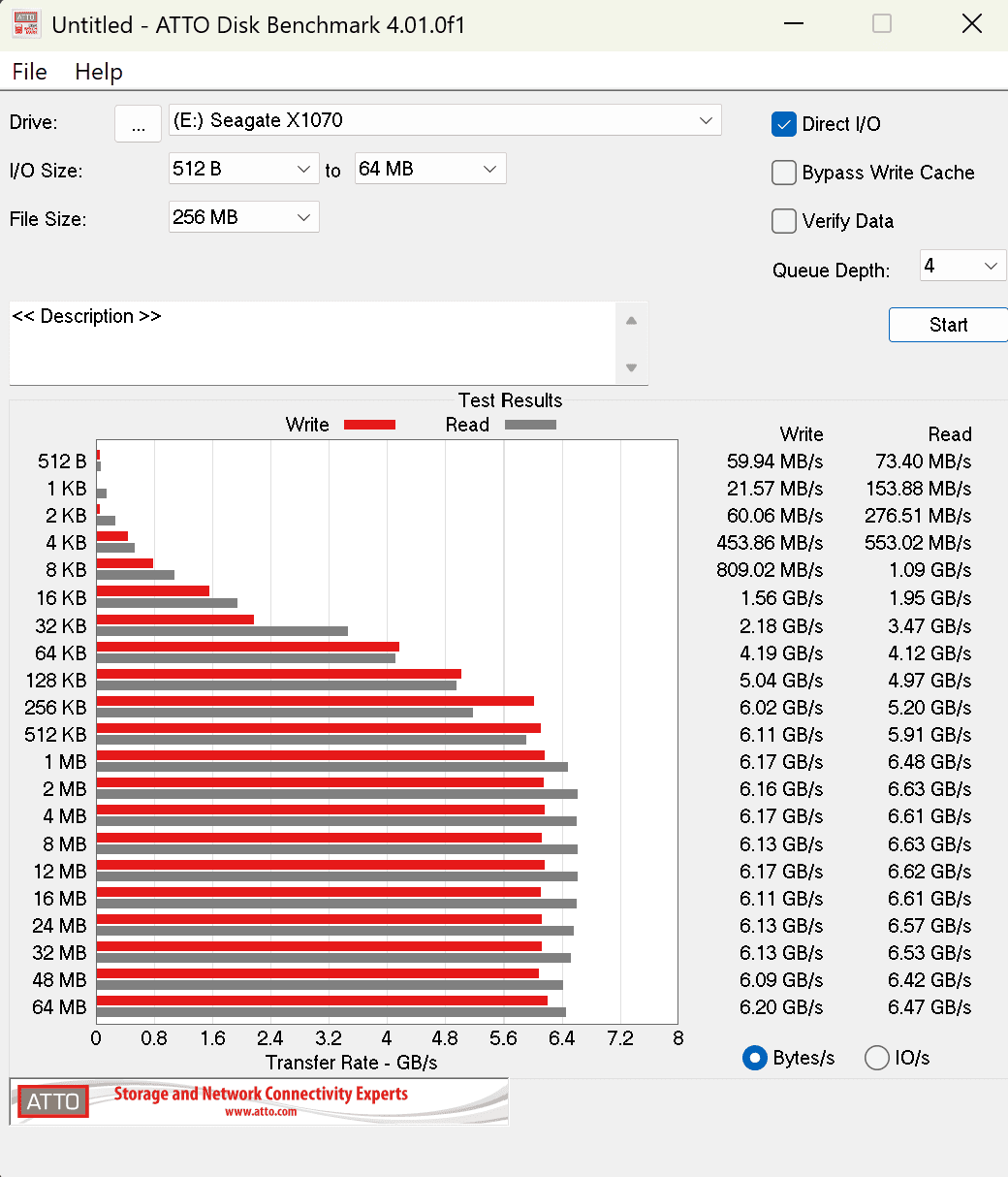
Here we see what I was hoping for—highly consistent speeds. It's wonderful when a drive can hit a shockingly high number for a moment, but it's far better to see that once the block size hits half a meg, you'll get consistently high speeds across the board. That makes it perfect for mixed-use cases where you have large and small files equally, not just shoving large files around. As games tend to be "bursty" (small files, large files, and everything in between at random intervals), this drive is perfect for that. The nice part is that even in larger sizes we don't see the exhaustion we'd expect to see out of a DRAM-less drive. The HMB approach is finally well-tuned and delivers very similar results as those with DRAM—solid engineering.
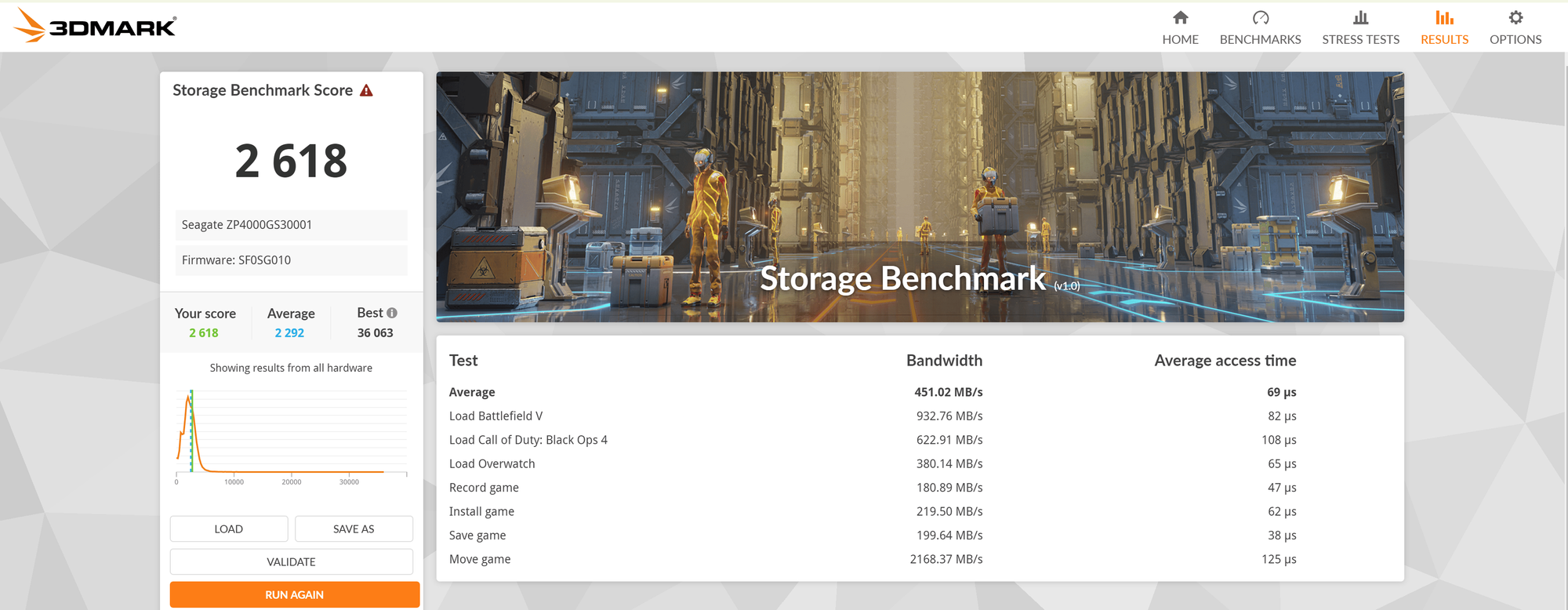
3DMark does a great job of really pushing the drive to its limits as it does drive copies, moves, short and long writes, and more. It also does so over multiple passes and across multiple games, providing an aggregate score. There's a second test to use for testing how it handles workloads, well, at work! Let's take a peek at PCMark 10.
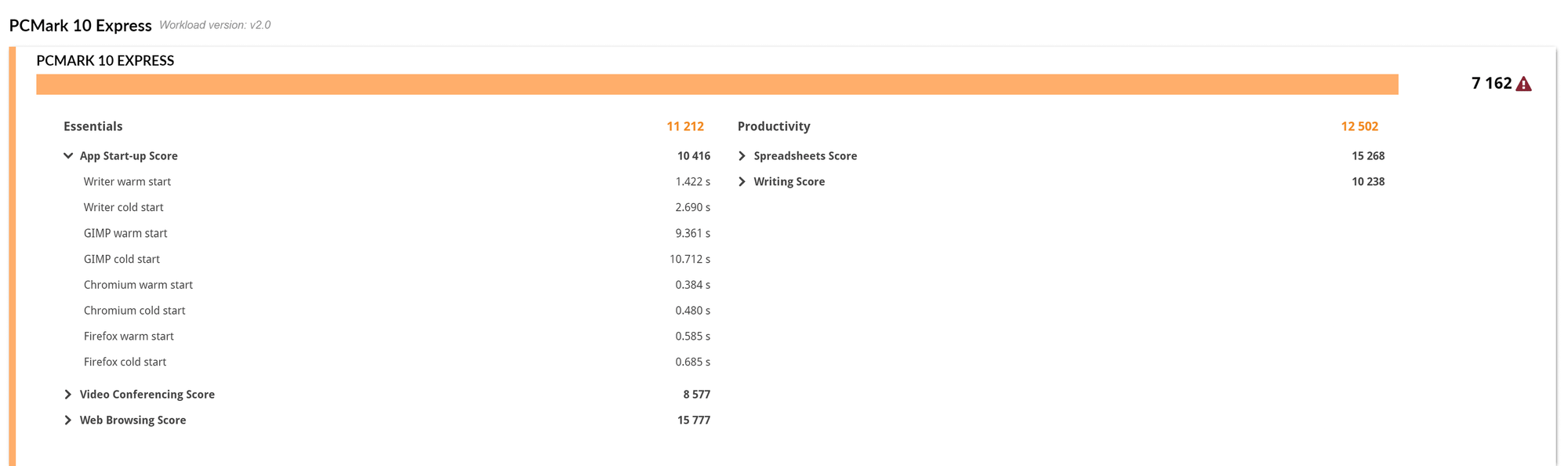
We've not been running this test, so this is our first set of numbers for comparison. There's still value here, though—it provides some startup times that are very impressive. Starting a browser in half a second is fantastic!
There is one other test we like to run. Despite its age, Final Fantasy XIV: Dawntrail is arguably the best MMO out there, and the load test is a clean way to see how it'll perform. While the score for performance isn't telling you much, the text file it generates does.

Loading Times by Scene
Scene #1 0.287 sec
Scene #2 1.887 sec
Scene #3 2.492 sec
Scene #4 2.64 sec
Scene #5 1.251 sec
Total Loading Time 8.557 sec
The loading time for these sequences are fantastic, even for a drive that isn't at the top of the food chain. Even complex and lengthy scenes are loading in less than three seconds. Again, it's a vacuum of a test just like 3DMark, but it does give us some real-world examples to look at.
Overall, there's only one area where we saw this drive hit exhaustion, and it's not a surprise—ridiculously large video edits. When shooting in 4K or 6K and moving 100GB+ files around, I saw a slight drop in performance. For that, I'd recommend a PCIe Gen 5 drive with DRAM as the more horsepower you can throw at such a task the better. 1080p and 1440p files, on the other hand, performed without any lag whatsoever.
Endurance, Software, and Ecosystem
As always, the last stop on any of our hardware reviews is around warranty and pricing. Seagate backs the X1070 with a five‑year warranty, and bundles each one with a license for Rescue Data Recovery Services. This is a decent backup tool that is helpful for keeping your important files backed up and safe. Seagate's own software will give you a great deal of information about drive health, as well as providing a secure erase utility should you need to format a drive while ensuring it cannot be recovered. Both of those softwares are included free of charge. In this case, Seagate also partnered up with Microsoft for a free month of Game Pass Ultimate, allowing you to test out their best offering for free—a nice bonus. Better still, if you are already a subscriber, it simply adds a month to what you're already using.
Pricing is tricky with storage and memory right now, but the X1070 is coming in at a reasonable price across all capacities in today's climate. The 1TB model is currently priced at $239, with 2TB coming in at $459 and 4TB at $829. Yes, these prices are very high right now, but it's also very clear that Seagate paid as much attention to cost considerations as they did ensuring that they were using the best build of materials possible. It's a good balance, and one that delivers solid performance at the best prices they could muster amidst the current shortages. If you need a high-capacity drive, the Seagate FireCuda X1070 is one worth considering.
Seagate FireCuda X1070 NVMe SSD
Excellent
The Seagate FireCuda X1070 is a well-rounded high-capacity NVMe that delivers precisely what it advertises on the box for a variety of uses cases including gaming, mixed workloads, productivity, and more. If extreme sustained writes are your need, you might aim slightly higher into Gen 5 territory, but for anything else, this is a fantastic drive more than worth the investment.
Pros
- Solid performance in mixed workloads
- Great for gaming
- Very consistent read and write speeds across all block sizes
- 5-year warranty and great software pack-ins
- Solid real-world performance
Cons
- Might see exhaustion in large sustained workloads
- Prices are reasonable, but still painful (which is not Seagate's fault)
This review is based on a retail version provided by the manufacturer.